
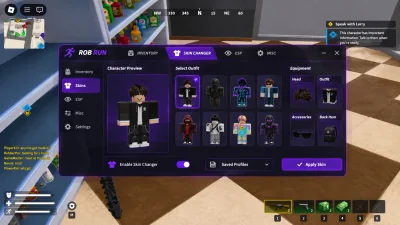
Skin Changer Compatibility: Questions Before Buying
Check the exact game, cosmetic categories, Windows requirements and license terms before ordering a local Skin Changer client.
The useful compatibility question is specific: does the current cosmetic client support the game, build and appearance category you want? A product name, storefront theme or illustration cannot answer that on its own. Use this checklist before ordering so the discussion covers your intended use rather than an assumed universal skin library.
Name the game and the current build
Start with the exact title and current client version. The Skin Changer listing describes coverage across supported games, but it does not establish ROB RUN compatibility. Ask support to confirm current coverage for your title before paying.
If you are returning after a patch, repeat the version check. A previous setup or an older image cannot confirm present behavior. Keep the distinction between a title being listed in a general category and its current build being supported.
Ask about the cosmetic category you need
The listed categories are weapon finishes, character outfits and knife styles. Name the category and the particular appearance you want to preview. Confirmation for one category should not be stretched into a claim that every cosmetic is available.
The client changes local appearance and does not add owned or tradable inventory. Other players are not expected to see the change. If you need permanent ownership, a transferable item or a server-wide change, those expectations do not match the local-display description. The ownership comparison explains that difference.
Check the Windows requirements independently
The cosmetic utility lists 64-bit Windows 10 or 11, enabled HVCI and Core Isolation, and enabled TPM and Secure Boot. Internet and access to the delivered loader are also required. Confirm the actual PC state instead of assuming the cheat package’s setup automatically covers a different product.
If one of those requirements is unavailable, describe the PC to support before purchasing. Follow the instructions supplied for the cosmetic client. A setting or launch order from an unrelated game or utility may not describe the version you receive.
Review the license and what remains local
The cosmetic license is separate from ROB RUN Cheats. Current access options and terms appear at external checkout. Read them with your intended game and PC in mind, including any binding or transfer conditions that matter to you.
Closing the client removes the listed local visuals, and patches can affect coverage. Third-party software can also lead to account action. A lifetime access label or a polished menu illustration does not turn those limitations into a permanent compatibility or safety promise.
Make the purchase question easy to answer
Send one clear request with the game build, Windows version, relevant hardware and desired cosmetic category. Ask what is currently supported and which instructions apply to that version. Use the support routes rather than treating an unverified discussion as product documentation.
Once the title and setup are confirmed, return to the product page for the current checkout destination. If your goal is aim assistance or player information, use the product comparison to check whether you need a different product altogether.
Checklist before ordering
- Exact game and current client build.
- Desired weapon, outfit or knife category.
- Local-display expectations and Windows prerequisites.
- Current access, delivery and device-binding terms.