
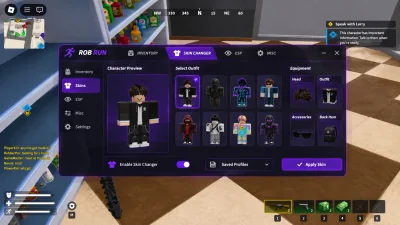
Skin Changer vs Owned Skins: What You Actually Get
Compare local cosmetic previews with owned inventory items, including visibility, trading limits and the checks to make before buying Skin Changer.
A Skin Changer license provides a local cosmetic client for supported games. The main buying question is what you expect to receive: a different appearance on your screen or an item attached to a game account. Those outcomes have different requirements and limits. Understanding the local-display model first helps you judge whether this product matches your goal.
What the cosmetic client displays
The Skin Changer product page lists weapon finishes, character outfits and knife styles. Its library is used through a lightweight client on your PC. The specific title and available cosmetic selection must be confirmed before purchase; a general library description does not establish that a particular game is supported.
Choose the appearance category you actually want before asking about coverage. A request for a particular weapon finish is more useful than a general question about whether all skins are available. The published categories do not establish an unrestricted library for every game.
Local appearance and owned inventory
The displayed cosmetics do not become owned inventory items and cannot be traded. A cosmetic license therefore does not add an item that you can transfer to someone else. If ownership or trading is your goal, this local-display product does not provide that outcome.
Other players are not expected to see the local change. Decide whether the appearance on your own screen is sufficient before you order. Do not treat a preview image as evidence that an item was granted to an account or made visible to an entire server.
What happens when you close the client
Closing the cosmetic client removes the visuals described by this product. That behavior follows the local-display model: access to the client and ownership of a game item are different things. A displayed finish should not be counted as a lasting inventory addition.
Updates can also affect coverage, so check the current client before returning after a patch. Avoid making plans around an old demonstration alone. The compatibility checklist shows what to ask about the game, cosmetic category and Windows setup.
The PC and license still matter
The listed requirements are 64-bit Windows 10 or 11 with HVCI, Core Isolation, TPM and Secure Boot enabled, plus internet and access to the delivered loader. The cosmetic license is separate from ROB RUN Cheats and from the Cloud DMA infrastructure product.
Read the current access options and terms at external checkout. A lifetime label does not establish permanent coverage for future patches, and third-party software can lead to account action. Confirm your intended title instead of assuming ROB RUN support from the storefront name or supplied artwork.
Choose according to the result you want
Use the cosmetic product when a confirmed local preview is the outcome you want. For player information, aim controls or radar, review ROB RUN Cheats. For infrastructure prerequisites, read Cloud DMA requirements. Each page describes a different product, so the purchase decision should follow the function rather than the image on a card.
Checklist before ordering
- Name the exact game and cosmetic category.
- Confirm that a local display meets your goal.
- Keep trading and inventory ownership expectations separate.
- Check current compatibility and access terms before paying.